Skip to content
Click
here
to kickstart your web apps now! One of our solution engineers is available for you. Click
here
to get your quote now!
Home
Product
Overview
Spreadsheet to App
Database AI Frontend
SQL Dump to App
GraphQL Frontend
Data Table
Data Sources
Automation
Localization
Videos
Live Demos
Pricing
FAQ
Contact
Home
Product
Overview
Spreadsheet to App
Database AI Frontend
SQL Dump to App
GraphQL Frontend
Data Table
Data Sources
Automation
Localization
Videos
Live Demos
Pricing
FAQ
Contact
Sign In
Sign Up
Sign In
Sign Up
Home
Product
Overview
Spreadsheet to App
Database AI Frontend
SQL Dump to App
GraphQL Frontend
Data Table
Data Sources
Automation
Localization
Videos
Live Demos
Pricing
FAQ
Contact
Home
Product
Overview
Spreadsheet to App
Database AI Frontend
SQL Dump to App
GraphQL Frontend
Data Table
Data Sources
Automation
Localization
Videos
Live Demos
Pricing
FAQ
Contact
Deby.AI Share Links
To test-drive your setup, you may paste the following demo share link:
https://app.deby.ai?app=lndz
To create a share link with your data:
Create your free account
or
sign-in
to Deby.AI.
Create an app by using Deby.AI generative copilot.
Select the
Access Links
menu to get all share links.
For better control, select the specific table
Configure
menu.
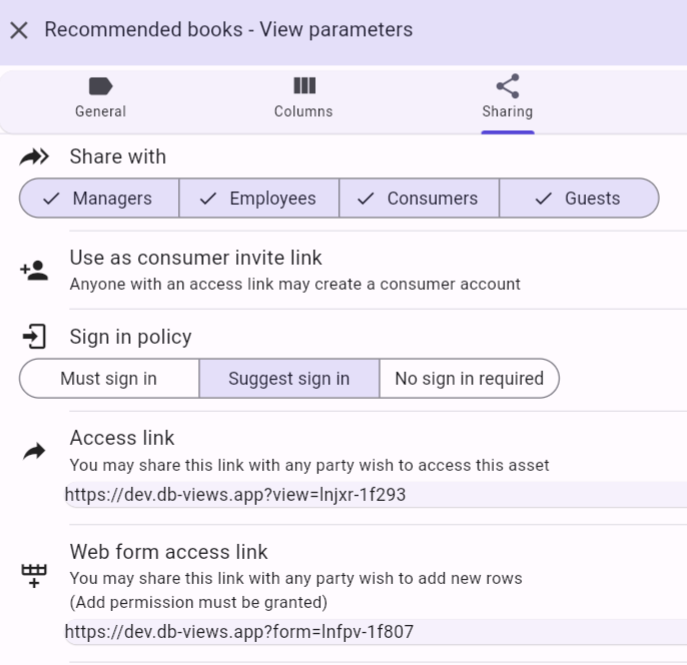
Open the
Sharing
tab. Select
Share with: Guests
to grant unlimited access. You may also
control the data access permissions and authentication
.
Copy the
share link
to the clipboard.
Paste the share link in email messages, web pages, news groups etc. You may also
embed it in any web page
.