
Autopilot Automation
Automation: Your Data on Autopilot
Describe what should happen in plain words. Deby.AI turns it into rules that watch your data, message your customers and team, collect payments, book deliveries, track market filings and connect thousands of apps, around the clock.
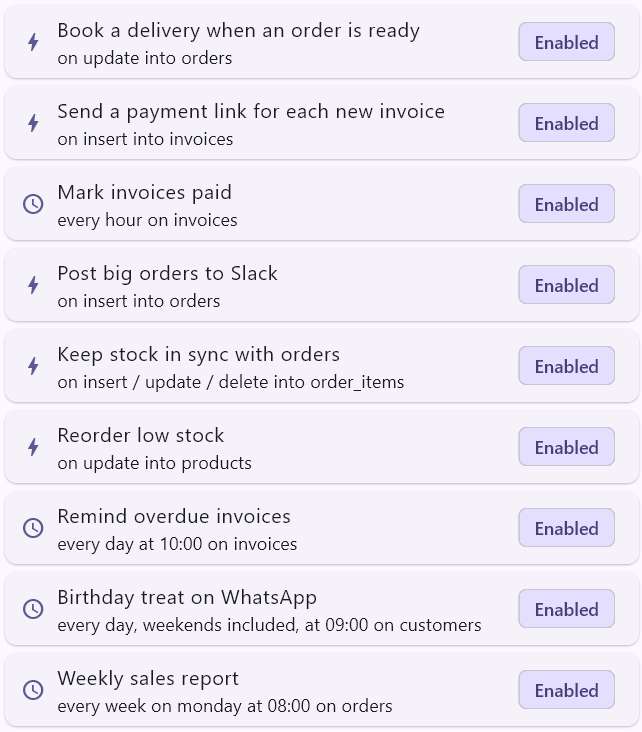
Live example: Orders, deliveries and payments that run themselves
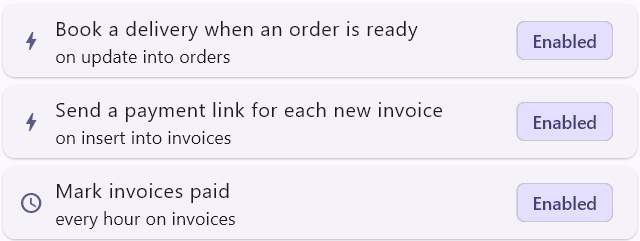
Mark an order Ready, and the courier is booked and the customer gets the tracking link on WhatsApp. Invoices go out with a Stripe payment link, and their status updates itself every hour. Each rule was described in a single sentence.
Highlights
- Rules in plain language. Write “Send each new invoice a payment link and WhatsApp the customer when the order ships” and get a working automation, checked before it goes live.
- Instant or scheduled. React the moment a record is added, changed or deleted, or run hourly, daily, weekly or monthly in your own time zone.
- Email, SMS and webhooks. Send rich HTML emails with live reports and text messages to any number, or call any web service.
- Built-in integrations, plus thousands more apps. WhatsApp, Stripe, Slack, Lalamove and SEC EDGAR work straight from your data. Zapier and Make connect thousands of other apps. The AI asks only for the settings it needs and sets up the rest.
- Data that stays in sync. Create and update records, and keep stock, balances and points correct as items are added, edited or removed.
- Knows your data. Related records are looked up automatically, and values appear as names and local dates, not raw IDs.
- Safe by design.
- Every rule is checked before it runs, and sending is limited per recipient.
- A key you paste in the chat is saved to your app and hidden immediately.
- Automations never move money, and a broken rule is paused and reported to you.
Major Functionality
Triggers: when it runs
- Record events: a record is added, updated or deleted. A rule can use one event or combine several.
- Change detection: run only when a value actually changes, e.g. when an order’s status changes to “shipped”, not on every edit.
- Schedules: every hour, day, week or month at the time you choose.
- Pick the weekdays or the day of the month. Daily schedules skip your country’s weekend by default.
- Runs missed during downtime are caught up automatically.
- Your time zone and language: times, dates and “today” follow your business, not the server.
Conditions: which records
- Filter on any field: equal to, ranges, lists, empty or not empty. Combine conditions with AND, OR and NOT.
- Relative dates cover reminders, overdue items and expiring items: “today”, “in the next day”, “within the last 2 weeks”.
- Anniversaries cover birthdays, renewals and work anniversaries, with February 29 handled.
- Field comparisons: “stock at or below its reorder level”.
- Computed fields can be used in conditions like any other field.
Actions: what happens
- Email: HTML messages with CC, personalized with any field of the record or of related records.
- SMS: phone numbers are converted to international format for your country.
- Webhooks:
- Call any HTTP endpoint (GET, POST, PUT, PATCH or DELETE) with your own headers and body.
- The service’s answer feeds the next steps, so you can store a result it computed.
- Integrations: WhatsApp, Stripe, Slack, Lalamove, SEC EDGAR, Zapier and Make by name. See Integrations below.
- Create and update records: create an invoice from an order, set a status, stamp a date.
- Counters: add to or subtract from a number in a single safe step, so rules running at the same time still add up correctly.
- Edits move the difference: change a quantity and only the difference is added or subtracted.
- Deleting the record gives its amount back.
- Lookups: fetch a related record and use its values.
- Reports: query, filter and sort a table, then send it as a formatted table in an email or as JSON to a webhook.
Integrations: services built in
- Set up from a plain request:
- Say “WhatsApp the customer when their order ships”. The AI asks, in one message, only for what it doesn’t know yet, such as your template’s name or your pickup address.
- It maps everything else to your app’s fields, and adds any fields that are missing.
- WhatsApp Business:
- Send approved template messages for order updates, reminders and confirmations, personalized with the customer’s details.
- Templates can include an image, a document (e.g. an invoice PDF) or a tracking-link button.
- Reply with a free-form message within 24 hours after the customer writes to you.
- Stripe payments:
- Create a payment link for any amount, e.g. an invoice, an order or a booking. Each link can be paid once, and the customer’s email is filled in for them.
- Send the link by email, SMS or WhatsApp in the same rule.
- Payment status (unpaid, processing, paid) is checked on a schedule, and links of canceled orders are switched off.
- Slack:
- Post to a channel or a teammate when something happens, e.g. a new lead, a big order or low stock.
- Later updates can go into the same thread.
- Lalamove delivery, from motorcycles to trucks, in 13 markets across Asia, Latin America and the Middle East:
- Book: get a price, book the delivery now or schedule it up to 30 days ahead, and cancel it if plans change.
- Track: delivery status and driver details are updated on a schedule.
- Tell the customer: send them the live tracking link.
- SEC EDGAR: insider trades and company filings, straight from the SEC. It’s free and official, with no account or key to set up.
- Insider trades (Form 4) for the stocks you watch: who traded, their role, buy or sell, shares, average price and total value, with a link to the filing.
- Company filings: earnings reports, annual reports and current events (10-Q, 10-K, 8-K), each described in plain words, e.g. “results of operations”.
- A daily digest by email or Slack: one line per new trade or filing.
- Zapier and Make: thousands more apps.
- Send a record’s details to a Zap or a Make scenario, which passes them on to Google Sheets, HubSpot, Mailchimp, Trello or any other app it connects.
- Your rule picks the fields to send. A Make scenario can even send back a value it computed, ready to save on the record.
- Paste a key, and it’s saved and hidden:
- Paste an API key, token or webhook address into the chat, and Deby saves it to the right setting in your app.
- It’s hidden on screen right away, and the AI never sees the full key.
- Keys are never written into your rules.
- Failures in plain terms:
- Your administrator is told why a service said no, e.g. “an address is outside the service area”, “no approved WhatsApp template of that name” or “the Slack app isn’t in the channel”.
- Account problems, such as rejected keys, no credit or a missing template, are reported once, not once per record.
- Never done twice, never empty:
- Each order is booked once, each invoice gets one payment link, and requests are never retried automatically.
- A check that finds nothing new sends nothing.
- Need another service? Ask for it.
- If a built-in integration already covers what you need, the assistant offers it. For example, ask for insider trading data from TradingView and you’re offered the SEC’s own filings.
- Otherwise, you can connect it today through Zapier or Make. Your request also goes to our team, and integrations are added on request.
Smart data handling
- Simple placeholders such as
{first_name}or{customer.email}work in every message and value. - Relationships are followed automatically, so a rule doesn’t need an extra lookup step.
- Readers see friendly values: names instead of IDs, and dates in their own format.
- A rule’s steps run in the right order on their own. For example, an email that shows a report waits for the report.
Reliability and control
- Checked before it goes live: unknown fields, mismatched types, missing integration settings and unresolvable placeholders are caught with clear messages, which the AI uses to fix the rule.
- No flooding: each customer and each channel gets a limited number of messages per run.
- No money moves on its own: automations never send transfers or payouts. Payments are collected only through payment links your customer approves.
- Self-healing:
- A rule that is broken, or that keeps failing, is paused automatically.
- Your administrator is notified once, and the rule stays paused after a restart until it is fixed.
- Full visibility: every rule can be seen at a glance, with its trigger, conditions and steps, integrations included.
Built with AI
Describe what you need when you build or update your app. Deby.AI writes the automation rules alongside your tables and dashboards, validates them against your data, and fixes any problems it finds. For an integration, it collects exactly the settings that service needs.
Popular Uses
- Morning birthday and anniversary greetings
- A payment link for every new invoice, with paid status kept up to date
- A WhatsApp message when an order ships, with a tracking-link button
- A Lalamove delivery booked when an order is ready, with the tracking link sent to the customer
- A morning digest of the insider trades and SEC filings for your watchlist
- New leads added to HubSpot or Google Sheets through Zapier or Make
- New leads and big orders posted to your team’s Slack channel
- Appointment and payment reminders by email, SMS or WhatsApp
- Low-stock alerts and automatic purchase orders
- A weekly summary report for each manager
Live example:
From order to delivery to payment, on autopilot
When an order is marked Ready, Deby.AI books a Lalamove courier, saves the tracking link on the order and WhatsApps it to the customer. Every new invoice gets a Stripe payment link by email, and an hourly check marks invoices paid as the money comes in. You describe each rule in a sentence, and it runs on its own from then on.
Extended live example:
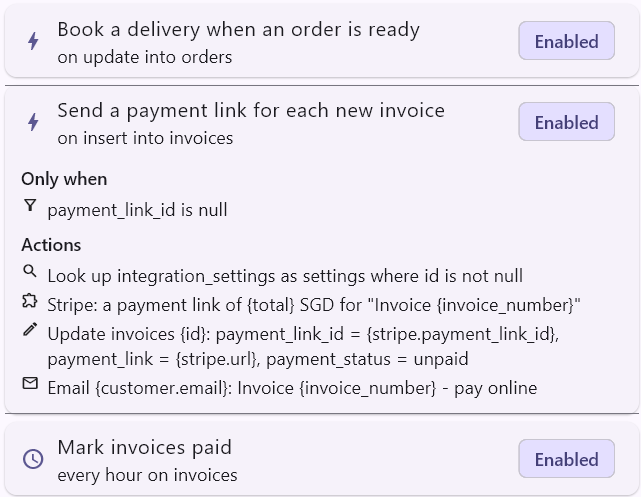
One status change, a whole delivery flow
Say “When an order is ready, book a Lalamove delivery and WhatsApp the customer the tracking link”, and Deby.AI turns it into a rule like this. When an order turns Ready, it books a courier, saves the tracking link on the order and sends it to the customer on WhatsApp. Each step passes its result to the next, and the same order is never booked twice.